Sequencing with Sockpuppet
There are a number of changes to the way in which layers are programmed or sequenced when running in Sockpuppet mode. The following section will outline these differences.
Layers with extended Sockpuppet functionality
Section titled “Layers with extended Sockpuppet functionality”Below are some layers which gain additional or changed functionality when controlled by Sockpuppet:
- Video Layer
- Notch Layer
- Gradient Layer
- Chevron Layer
Dormant layers
Section titled “Dormant layers”Dormant layers are a feature that enables the stacking of large numbers of layers on the timeline. The issue with this previously was that each layer on the timeline required a certain amount of system resources in order to run, which would quickly add up when working with large numbers and result in a significant drop in performance. Now, when a layer is set to be dormant, it will not require any system resources, and therefore mean we can have large stacks of layers on our timeline and not have to worry about performance issues.
Setting a layer to be dormant
Section titled “Setting a layer to be dormant”To make a layer dormant, simply set the brightness to 0. This will change the colour of the layer to dark green to signify that the layer is now dormant. Raise the value above zero to make the layer active.
RGB colour overview
Section titled “RGB colour overview”When running in Sockpuppet mode, the colour palette system with its X and Y values is ignored and instead replaced by an RGB colour system. This is to reflect the typical way of working with colour on a lighting console.
Layer field options
Section titled “Layer field options”When editing a layer that is being controlled by Sockpuppet, there are additional controls available to change how each field of a layer is controlled.
Layer options
Section titled “Layer options”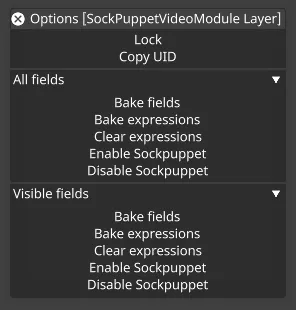
When right-clicking on the titlebar of a layer, there are additional options to control the enabling or disabling of Sockpuppet across the entire layer. There are three different rollouts that you can control, they are:
- All fields
- Selected fields (when editing multiple layers)
- Visible fields (If a section/group is closed, it will not be impacted)
These buttons allow users to quickly disable Sockpuppet across an entire layer and re-enable only the fields that should be controlled.
Field options
Section titled “Field options”When right-clicking on a single field, there are changes to the field options when the layer is controlled by Sockpuppet.
Metafield
Section titled “Metafield”Metafields do not affect fields when they are being controlled by Sockpuppet; ranges and step size should be controlled through the personality editor instead.
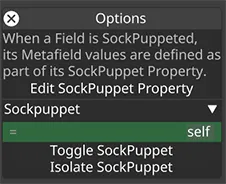
Toggle Sockpuppet
Section titled “Toggle Sockpuppet”The Toggle Sockpuppet feature allows you to selectively disable the Sockpuppet functionality for any parameter within a patched layer.
For example, if you have a Bitmap layer patched and you want Sockpuppet control over all parameters except Brightness, which you want to keyframe, you can now right-click on the Brightness parameter and select “Toggle Sockpuppet”.
This action removes that parameter from Sockpuppet mode, allowing it to be animated or keyframed independently.
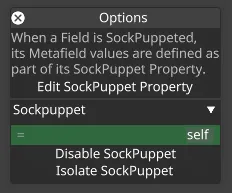
When a field is Sockpuppeted, its metafields are determined by the Sockpuppet property, as part of the layer’s Sockpuppet personality. The widget is linked to this property, allowing you to edit the associated metafields directly.
Isolate Sockpuppet
Section titled “Isolate Sockpuppet”The Isolate Sockpuppet feature keeps Sockpuppet enabled only on the selected parameter, while disabling Sockpuppet functionality on all other parameters within the patched layer.
This allows you to focus Sockpuppet control exclusively on a single parameter without interference from others.
While an isolate is active, the other Sockpuppet-enabled fields on the layer are tinted a muted, darker green to show that they are still configured for Sockpuppet control but are not currently being driven. This leaves only the isolated field in the regular, brighter Sockpuppet green, so you can see at a glance which parameter the layer is actually responding to. It is the same muted green that Designer uses to mark a temporarily disabled expression. Clearing the isolate restores the regular green to those fields.
To revert this change, use De-isolate Sockpuppet, which restores the original Sockpuppet settings for all parameters in the layer.