

Depth Video Layer
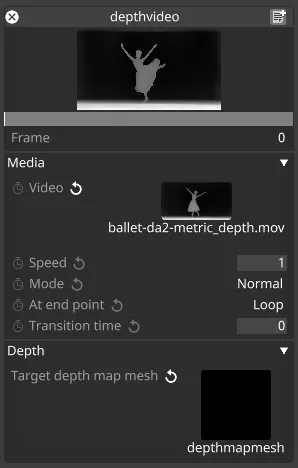
The Depth Video layer applies a depth map video directly to a Depth Map Mesh. The video should be a black and white depth map defining relative depths of objects in an image. The z positions of the vertices of the Depth Map Mesh will adjust dynamically based on the content mapped to it using the Depth Map Mapping.
The Depth Video layer is a subtype of the Video Layer.
Workflow
Section titled “Workflow”- Create a new Depth Map Mesh and assign it as the mesh of a stage object such as a screen.
- Add a depth-map image or video to the project’s
objects/VideoFilefolder. - Create a new Depth Video Layer and choose the Depth Map Mesh as its Target depth map mesh.
- The stage object’s geometry now deforms in real time based on the values in the depth-map content.
Properties
Section titled “Properties”Developed as a subclass of the Video layer, most properties in the Depth Video Layer match those of the standard Video Layer.
The key difference is that instead of using a Mapping, the Depth Video Layer exposes a Target depth map mesh property. This determines which mesh receives the video-driven depth deformation.