

Devices Index
Designer supports a number of devices. The Devices section includes documentation about how to create, use and record devices. It also covers information about all of the devices we support, including motion control systems, automation devices, matrices, routers, and video inputs.
Using Devices
Section titled “Using Devices”The following pages describe how to create and record devices.
Using Motion Control Systems
Section titled “Using Motion Control Systems”The following pages describe how to use Motion Control System with Designer.
- Motion Control Systems
- Position Drivers
- Creating a New Motion Controller
- Axes
- Creating Driver Axes
- Tracking Source
- Position Axis Expressions
Devices
Section titled “Devices”To find the list of devices available in Designer, right-click Devices in the dashboard. This opens the Device Manager, where the full menu of active devices is listed.
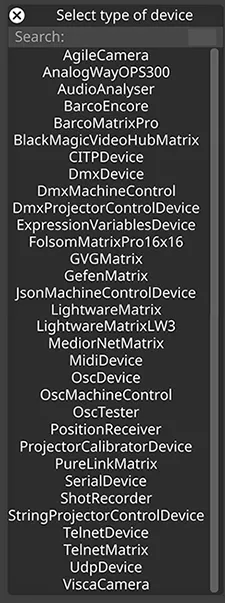
- Agile Camera : A virtual camera device enabling programmable and keyframed camera moves within Designer.
- Audio Analyser : Analyses an audio source so its level and frequency content can drive parameters in Designer.
- CITP Device : Supports the integration of CITP-enabled lighting consoles for media preview and thumbnail distribution.
- DMX Device : Sends and receives DMX channels for lighting, automation, or external control. Supports protocols Art-Net, Enttec, ezDMX, KiNET v1, KiNET v2, sACN, and SoundLight.
- DMX Machine Control : Sends remote and shutdown commands to Designer to remotely shutdown Disguise machines.
- DMX Projector Control : Provides DMX-based control for external projectors.
- Expression Variables : Defines variables that can be used in Designer to build dynamic, custom behaviours.
- JSON Machine Control : Allows for the querying of machine list and machine status via JSON.
- MIDI Device : Allows triggering, automation, and control through standard MIDI messages.
- OSC Device : Sends and receives OSC messages for flexible, network-based control.
- OSC Machine Control : Allows restart and shutdown commands to be sent from an external OSC device.
- OSC Tester : Allows users to test incoming and outgoing OSC messages from Designer.
- Position Receiver : Receives real-time positional data for tracking objects or performers.
- Projector Calibrator : Automatically aligns projectors to physical surfaces using tracked reference points.
- Shot Recorder : Allows users to record and export parameters from within Designer, ready for use in post-production workflows.
- String Projector Control : Used to control external devices while optionally simulating their behaviour inside the visualiser.
- Telnet Device : Used to send commands over a TCP network connection to 3rd party products.
- UDP Device : Used to send commands over a network via UDP to 3rd party products.
- Visca Camera : Controls VISCA-compatible PTZ cameras over network connection.
Matrix Switches
Section titled “Matrix Switches”Designer supports the following Matrix Switches:
- Analog Way OPS300 : Supports routing control for the Analog Way OPS300 switcher.
- Barco Encore (External Link)
- Barco MatrixPro : Enables routing operations for Barco MatrixPro systems.
- Gefen Matrix (External Link)
- Lightware Matrix : Integrates with Lightware matrices for video routing and monitoring.
- PureLink Matrix : Provides control for PureLink AV matrix devices.
- Telnet Matrix : Generic matrix control using Telnet-based command sets.
Routers
Section titled “Routers”Designer supports the following routers:
- Blackmagic Smart Videohub : Controls Videohub routing and crosspoint configurations.
- Riedel MediorNet : Communicates with MediorNet systems for routing and management.
Tracking
Section titled “Tracking”A number of tracking and automation drivers are supported in Disguise. They appear in the driver picker when you add a driver to a Position Receiver device.
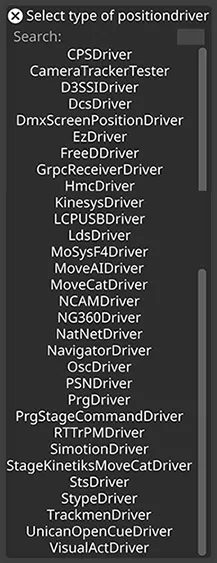
Here, drivers are grouped by function — see the Position Drivers and Generic Receivers sections in the sidebar. The full list, organised by what each driver does, is below. Note: DMX-family protocols (Art-Net, sACN, KiNET, etc.) are output options on the DMX Device rather than standalone drivers — they appear under DMX Device in the sidebar.
Position Drivers
Section titled “Position Drivers”Position Drivers decode positional data from a motion control system and emit it onto PositionAxis objects inside a Position Receiver device. Grouped below by what they sense.
Tracking System Drivers
Section titled “Tracking System Drivers”Camera, object, and people tracking systems.
- Camera Tracker Observations Tester : Used for validating and troubleshooting observation data received from external camera-tracking systems.
- Camera Tracker Tester : A type of PositionDriver that can be used to simulate camera tracking data.
- Captury Driver : Receives markerless full-body, finger and facial motion capture data from Captury Live.
- EzDriver : Receives tracking data over the network via the EZ protocol.
- FreeD Driver : Receives FreeD camera-tracking protocol data.
- LDS Driver : Receives lens aperture and focus distance from ARRI cameras via the LDS protocol.
- Mo-Sys F4 Driver : Connects to Mo-Sys F4 tracking hardware.
- MoveAI Driver : Real-time markerless motion-capture data from MoveAI systems.
- NatNet Driver : Receives tracking data using the NatNet protocol.
- Ncam Driver : Supports Ncam camera tracking for virtual production.
- NG360 Driver : Receives positional data from NG360 tracking systems.
- OpenTrackIO Driver : Receives real-time camera tracking and lens data over the SMPTE OpenTrackIO protocol.
- RTTrPM Driver : Connects to RTTrPM real-time BlackTrax tracking systems.
- Skeleton Tracker Tester : Simulated skeleton tracking.
- Stype Driver : Integrates Stype camera-tracking data.
- Trackmen Driver : Trackmen camera tracking.
- Vicon Datastream Driver : Vicon tracking data stream.
Stage Automation Drivers
Section titled “Stage Automation Drivers”Stage motion, rigging, and screen-positioning systems.
- CPS Driver : Interfaces with CPS automation systems (motor positions).
- D3SSI Driver : Receives single-axis encoder position data over the D3SSI protocol via UDP.
- DCS Driver : Interfaces with DCS stage automation/control systems.
- DMX Screen Position Driver : Tracks screen or object position via DMX.
- HMC Driver : Integrates with Hudson Motion Control systems over UDP.
- Kinesys Driver : Controls Kinesys motion systems for lifts, winches, and rigs.
- LCPUSB Driver : USB-based industrial PC controller for automation.
- Movecat Driver : Interfaces with Movecat kinetic systems.
- Navigator Driver : Integrates with Navigator automation controllers.
- PosiStageNet Driver : Tracks performer or object motion via PSN.
- Posital Driver : Posital encoder/sensor positional input.
- PRG Driver : Integrates with PRG motion systems.
- PRG Stage Command Driver : Supports Stage Command for PRG automation.
- SIMOTION Driver : Interfaces with Siemens SIMOTION controllers.
- SKV Driver : SKV control system driver (varies by setup).
- Stage Kinetics MoveCat Driver : Controls Movecat motion via Stage Kinetics protocol.
- STS Driver : Connects to STS automation hardware.
- Unican Open Cue Driver : Receives position data from Unican Open Cue (OpenPosIP) automation systems over UDP port 16000.
- VisualAct Driver : Communicates with VisualAct winches and lifts.
Generic I/O Drivers
Section titled “Generic I/O Drivers”Generic protocol carriers that operate as Position Drivers.
- OSC Driver : Enables automation control using OSC routing.
Generic Receivers
Section titled “Generic Receivers”Generic I/O and data receiver drivers — protocol carriers for custom integration or testing.
- gRPC Receiver Driver : Receives structured gRPC data.
- Test Receiver Driver : Internal test data receiver.
- UDP Receiver Driver : Generic UDP packet input.
Video Input
Section titled “Video Input”Video Inputs supported by Disguise include:
- 4K Quad Link Capture : Allows ingest of 4K video over quad‑link SDI.
- ST 2110 Video Capture : Receives uncompressed IP video signals using ST 2110.
- Setup Video Input : Walkthrough for configuring and routing video inputs.
- Video De-Interlacing Methods : Explains how Designer de-interlaces video.