

CPS Driver
The CPS Driver receives automation data from systems that communicate using the CPS protocol. CPS is used by certain motion-control and automation devices to send positional or status information that can drive content alignment or provide positional feedback inside Disguise.
In most cases, the default driver settings are sufficient. Only adjust these settings if your automation network requires specific ports, multicast addressing, or IP filtering.
Use the CPS Driver when your production involves:
- Automation devices or controllers that output motion or position data using the CPS protocol
- Synchronising content with real-world movement such as lifts, winches, or tracked scenic elements
- Triggering timeline behaviour based on machine motion
- Monitoring automation positions directly inside Disguise
- Lightweight motion feeds where only core positional or state data is needed
CPS is commonly used in installations or productions requiring simple, reliable position updates.
Driver Properties
Section titled “Driver Properties”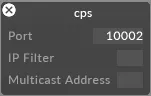
This driver listens on UDP port 10002 by default.
Port
The UDP port on which the driver receives data. Set this to match the port configured on the sending device or controller.
IP filter (optional)
Restricts incoming data to a specific source IP address. Useful when several sources are present on the network, or to isolate a single sender. Leave blank to accept data from any IP.
Multicast address (optional)
The multicast group address used by your system. Only required when the sender is configured for multicast — enter the exact multicast address used by the emitter. Leave empty for unicast or broadcast configurations.
Developer Documentation