

PosiStageNet Driver
The PosiStageNet (PSN) Driver receives real-time positional data transmitted using the PosiStageNet protocol.
PSN is a widely adopted standard in the live events and motion control industry, providing accurate 3D position and velocity data for automation, tracking, and synchronisation workflows. Disguise uses this information to drive automation axes, track objects, or integrate motion data into virtual production environments.
Most installations function correctly with the default configuration. Adjust network settings only if your PSN system uses custom addressing or multiple tracking devices operate on the same network.
Use the PosiStageNet (PSN) Driver when integrating real-time positional data from motion tracking systems that support the PSN protocol. PSN provides precise 3D coordinates and velocity information, making it ideal for synchronising virtual objects, media, or automation with physical movement on stage.
This driver is especially useful when:
- Tracking performers, props, cameras, or scenic elements in live events.
- Synchronising virtual production or xR environments with real-world movement.
- Controlling automation axes using continuous 3D positional data.
- Integrating tracking workflows from systems such as BlackTrax, Stype, zactrack, or any PSN-capable emitter.
- Driving interactive or reactive content that needs to follow real-time stage positions.
- Aligning lighting, visuals, or projection-mapped elements with tracked objects.
- Monitoring, testing, or validating incoming PSN data streams during setup or calibration.
As PSN is highly accurate and low-latency, it is widely used across touring productions, installations, theatres, broadcast studios, and virtual production stages where motion-to-media synchronisation is essential.
Driver Properties
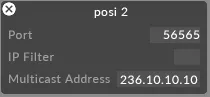
Section titled “Driver Properties”This driver listens on UDP port 56565 by default.
Port
The UDP port on which the driver receives data. Set this to match the port configured on the sending device or controller.
IP filter (optional)
Restricts incoming data to a specific source IP address. Useful when several sources are present on the network, or to isolate a single sender. Leave blank to accept data from any IP.
Multicast address (optional)
The multicast group address used by your system. Only required when the sender is configured for multicast — enter the exact multicast address used by the emitter. Leave empty for unicast or broadcast configurations.
Developer Documentation