

Movecat Driver
The Movecat Driver receives automation data from Movecat motion control systems. Movecat systems are commonly used for stage hoists, kinetic movement, and automation elements that require precise positional and motion feedback. The driver allows Disguise to receive real-time movement data over the network and use it to drive automation axes within a project.
In most installations, the default driver settings are sufficient. Configuration changes should only be made if your Movecat system uses custom network parameters or you need to limit incoming data to a specific device.
Use the Movecat Driver when integrating Movecat motion control systems with Disguise to synchronise real-world movement with virtual or media-driven elements. Movecat systems provide precise positional and motion feedback from hoists, winches, and kinetic stage machinery, allowing Disguise to react dynamically to physical movement in real time.
This driver is especially useful when:
- Receiving live positional data from Movecat hoists, trolleys, or kinetic systems.
- Synchronising virtual objects or content with physical scenic movement.
- Visualising real-world motion inside Designer for alignment, rehearsal, or pre-programming.
- Driving automation axes based on continuous movement feedback.
- Monitoring multiple Movecat devices during complex motion cues.
- Ensuring media, lighting, and virtual elements track accurately with stage automation.
Thanks to Movecat’s reliable high-frequency updates, the driver is well-suited for productions requiring smooth, accurate motion synchronisation between physical and virtual systems.
Driver Properties
Section titled “Driver Properties”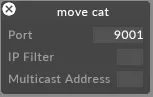
This driver listens on UDP port 9001 by default.
Port
The UDP port on which the driver receives data. Set this to match the port configured on the sending device or controller.
IP filter (optional)
Restricts incoming data to a specific source IP address. Useful when several sources are present on the network, or to isolate a single sender. Leave blank to accept data from any IP.
Multicast address (optional)
The multicast group address used by your system. Only required when the sender is configured for multicast — enter the exact multicast address used by the emitter. Leave empty for unicast or broadcast configurations.
Developer Documentation