

VisualAct Driver
Introduction
Section titled “Introduction”The VisualAct Driver allows Disguise to receive positional data from VisualAct systems.
This enables synchronised motion control workflows where moving scenic elements, lifts, or tracking systems send real-time data directly into Disguise.
Default settings are suitable for most installations unless your VisualAct system is configured with custom network parameters.
Use this driver when you need to:
- Receive movement or automation state data from VisualAct hardware.
- Synchronise motion-controlled elements with virtual scenes or content.
- Integrate scenic automation into Disguise timelines or triggering systems.
- Support multicast or unicast delivery depending on your VisualAct setup.
Driver Properties
Section titled “Driver Properties”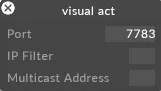
The UDP port used to receive VisualAct automation data.
This must match the port configured on the VisualAct system that is transmitting the data.
IP filter
Section titled “IP filter”An optional filter that restricts incoming packets to a specific sender IP address.
Use this when multiple devices are on the network and you want to ensure only the intended VisualAct source is accepted.
Multicast address
Section titled “Multicast address”The multicast group the driver listens to when receiving VisualAct data via multicast.
Only required if your workflow uses multicast delivery, leave blank for standard unicast setups.
Developer Documentation