

MyDisguise Overview
MyDisguise is your new home for Disguise software, and it replaces Disguise Cloud. Your profile, subscriptions, licenses, downloads and billing live in one place, behind the login you already use.
You can buy monthly or yearly subscriptions online, renew, upgrade or cancel on your own terms, and assign licenses and roles across your team, without waiting on a manual process or an email exchange.
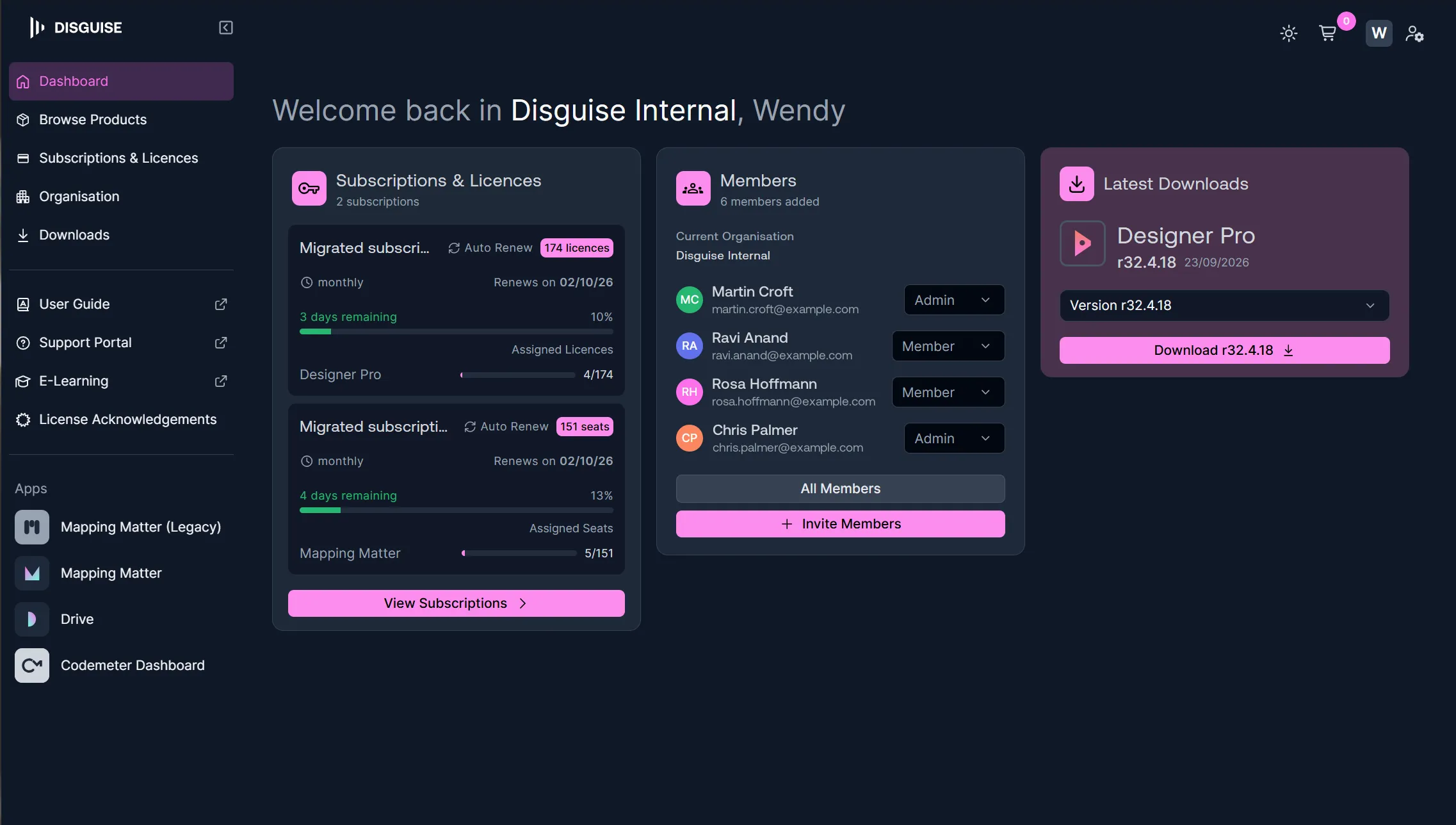
What you can do in MyDisguise
Section titled “What you can do in MyDisguise”MyDisguise is organised into five areas:
- Dashboard is where you land after signing in. It summarises your subscriptions and licenses, your Organisation’s members, and your most recent downloads.
- Browse Products is where you browse and compare Disguise products, choose a monthly or yearly billing cycle, and buy.
- Subscriptions & Licenses is the single view of everything you own, including renewal dates, how many days remain, auto-renew, and who each license or seat is assigned to.
- Organisations is where you manage your company or team’s shared account, its details, and its members and their roles.
- Downloads is where you get Designer installers, including earlier releases.
Selecting the Disguise logo, top left, returns you to the Dashboard from anywhere.
The Apps section of the sidebar opens the Disguise tools you already have access to: Mapping Matter, legacy Mapping Matter, Disguise Drive, and the CodeMeter license portal.
The sidebar also links out to other Disguise destinations, using the same sign-in: the User Guide, Support, E-learning, and License Acknowledgements.
Available products
Section titled “Available products”You can discover, purchase and manage Designer Starter, Designer Pro, X Series and Mapping Matter. The product set will expand over time.
Designer Starter is a free download rather than a purchase, Designer Server is arranged through Disguise sales, and RenderStream is bought on the Disguise Store.
Signing in
Section titled “Signing in”If you already use Disguise Cloud, sign in to MyDisguise with your existing Disguise Cloud credentials. There is no new account to create.
If you are new to Disguise, create a MyDisguise account directly on the platform, with an email address and a password or with your Google credentials. Creating the account sets up your Disguise ID, which is your single Disguise identity and gives you one sign-in across Support, Community and learning.
What happens to your Disguise Cloud account
Section titled “What happens to your Disguise Cloud account”Everything moves with you. Your login, products, subscriptions and licenses all carry over, with no interruption to access, and there is no manual data work for you to do.
- Your pricing does not change. All your existing entitlements stay the same.
- Disguise Cloud Studio subscriptions become Mapping Matter subscriptions. There is no extra charge and no price change, and your subscription covers both the current and legacy versions of Mapping Matter, as well as Disguise Drive. Mapping Matter is now assigned by seat, so assign those seats before your team expects access.
- Disguise Drive is not part of this migration phase. Drive access continues through MyDisguise, and more information will follow.
Your team comes with you too, so your members and their access are preserved rather than rebuilt.
Related links
Section titled “Related links”- Getting Started with MyDisguise: Create an account, sign in, and set up your Account details.
- Managing MyDisguise Organisations: Create or join an Organisation, and change its settings.
- Managing Your Team: Invite people, assign roles, and manage who has access.
- Purchasing Products: Browse and compare Disguise software, and buy it.
- Managing Subscriptions: Renew, change or cancel a subscription, and control auto-renew.
- Managing Licenses: Assign licenses and seats to your team, and find where activation is covered.
- MyDisguise FAQs: Answers on accounts, Organisations, roles, buying, subscriptions, licenses and migration.
- Disguise Cloud: Information about the legacy platform.