

OpenTrackIO Driver
The OpenTrackIO Driver allows Disguise to receive real-time camera tracking data using the OpenTrackIO protocol.
OpenTrackIO is a free, open protocol developed by the SMPTE RIS-OSVP (Rapid Industry Solutions – On-Set Virtual Production) group. It provides a single, vendor-neutral way to exchange camera pose, lens, and device metadata between the systems used in virtual production, replacing the proprietary protocols that tracking vendors have historically shipped.
The driver interprets this data and applies it to tracked cameras and automation workflows within Disguise. As an open standard adopted by a growing range of camera manufacturers, tracking vendors, and render engines, OpenTrackIO is increasingly used as an alternative to protocols such as FreeD.
We recommend using the default driver settings unless your tracking system or network setup requires custom configuration.
Use the OpenTrackIO Driver whenever Disguise needs to receive real-time camera tracking information from an OpenTrackIO-compatible source. It maps physical camera movement and lens behaviour into the virtual scene using an open, standardised protocol.
This driver is especially useful when:
- Integrating OpenTrackIO-compatible camera-tracking systems into Disguise.
- Driving tracked cameras in AR, xR, ICVFX, or virtual studio environments.
- Receiving lens metadata such as focal length, focus distance, aperture, and distortion.
- Synchronising live camera movement with rendered content.
- Standardising on an open protocol instead of maintaining vendor-specific integrations.
- Future-proofing tracking pipelines as OpenTrackIO adoption grows across the industry.
By interpreting camera pose and lens data accurately, the OpenTrackIO Driver helps ensure real-world camera motion aligns correctly with virtual content.
Driver Properties
Section titled “Driver Properties”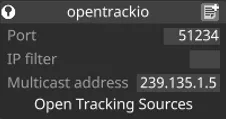
OpenTrackIO data is transmitted over UDP, with multicast support.
This driver listens on UDP port 55555 by default.
Port
The UDP port on which the driver receives data. Set this to match the port configured on the sending device or controller.
IP filter (optional)
Restricts incoming data to a specific source IP address. Useful when several sources are present on the network, or to isolate a single sender. Leave blank to accept data from any IP.
Multicast address (optional)
The multicast group address used by your system. Only required when the sender is configured for multicast — enter the exact multicast address used by the emitter. Leave empty for unicast or broadcast configurations.
Developer Documentation
External reference
Section titled “External reference”SMPTE OpenTrackIO Documentation: