

OSC Driver
The OSC Driver receives Open Sound Control (OSC) messages from external devices or applications and converts them into automation values within Disguise. OSC is a flexible, network-based protocol widely used in show control, lighting, interactive media, audio systems, and real-time visual environments.
The driver exposes two key properties: the OSC device that provides the messages, and an optional address filter that determines which OSC messages should be processed.
Use the OSC Driver when you need to bring real-time OSC messages into Disguise to control automation axes, trigger behaviours, or drive interactive elements. OSC is a flexible protocol used across creative, live, and interactive industries, making this driver ideal for workflows that rely on external systems sending numerical or event-based data.
This driver is especially useful when:
- Driving automation axes from software such as TouchDesigner, Max/MSP, QLab, Unreal, Unity, Ableton, or other OSC-capable tools.
- Triggering cues, animations, or logic events through OSC messages.
- Integrating interactive installations where sensors, cameras, or custom scripts output OSC.
- Bridging media servers, lighting consoles, sound systems, or control devices into Disguise.
- Prototyping and testing real-time data streams without specialised hardware.
- Filtering and routing OSC messages when multiple devices share the same OSC network.
As OSC supports arbitrary data structures and address paths, the driver is well-suited for custom workflows, creative prototyping, and interactive designs where flexible control is required
Driver Properties
Section titled “Driver Properties”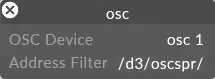
OSC Device
Section titled “OSC Device”Selects the OSC device that Disguise should listen to.
This may represent:
- A software source (e.g., TouchDesigner, QLab, Max/MSP, Unreal).
- A hardware controller that outputs OSC messages.
- Any OSC-capable system configured as a sender.
Disguise will receive all messages routed from the chosen device, subject to the address filter.
Address Filter
Section titled “Address Filter”Allows you to specify the OSC address path prefix for messages Disguise should process.
- Enter the OSC address excluding the axis name.
- Leave this field empty to receive all OSC messages.
Examples:
/d3/oscspr//stage/pos//camera/zoom/
This filter is useful for isolating a subset of OSC messages when multiple systems or scripts share the same OSC network.
Developer Documentation