

Porta Bridge RossTalk 連携
Porta Bridge は、Porta が他のプロセス(Designer(d3 ソフトウェア)、MOS、RossTalk/Chyron/GPI など)に接続するための通信ゲートウェイとして使用されます。
External Commands Panel は、以下を含む外部トリガーソースからコマンドを受信するためのものです。
- RossTalk
- Connection: TCP ソケット
- Format: RossTalk プロトコル仕様に従ったプレーンテキストコマンド
- Ross Video スイッチャーや互換性のある制御システムからトリガーコマンドを受信するために使用します
- Chyron(CII – Chyron Intelligent Interface)
- Connection: TCP ソケット
- Format: Chyron CII プロトコル仕様に従ったプレーンテキストコマンド
- Chyron 互換のキャラクタージェネレーターや制御システムからトリガーコマンドを受信するために使用します
- GPI(General Purpose Interface)
- Connection: シリアル(ハードウェア)
- Format: ホストコンピューターに取り付けられた SeaLevel GPIO カードに接続された物理スイッチャーボードを介した電気信号
- Requirement: SeaLevel GPIO カードが取り付けられている必要があります。このプロトコルはカードがないと機能しません
Porta に接続する方法
Section titled “Porta に接続する方法”ステップ 1:
- Porta 構成を確認(Ensure Porta Configuration): Window->Porta に移動し、API URL と Porta API Key が正しく入力されていることを確認します。
- Socket Server URL: Socket Server の場所。Porta Interface->File->My Account->Integrations に移動し、「Socket Server」をダブルクリックして URL を表示します。
- Porta API Key: Porta Interface->File->My Account->Integrations に移動し、「API Key」をダブルクリックしてキーを表示します。
ステップ 2:
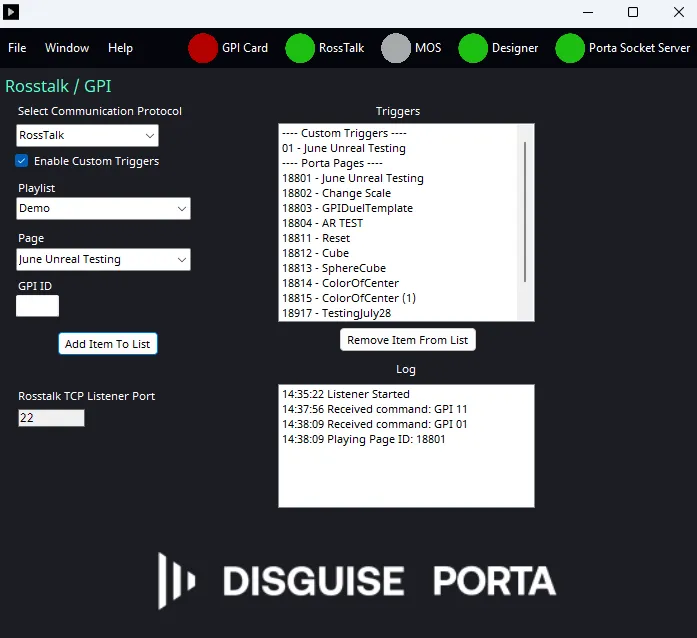
- RossTalk/Chyron 構成を指定(Specify Rosstalk/Chyron configuration): Window-> RossTalk/GPI に移動します。 RossTalk/Chyron TCP Listener Port: RossTalk コマンドをリッスンするポートを指定します。デフォルトは 7788 です。
- Log: トラブルシューティング/監視のために、GPI ID の受信の実行ログを表示します。
Porta で接続をテストする
Section titled “Porta で接続をテストする”RossTalk/Chyron または GPI コマンドへの接続に成功すると、ログには次が記録されます。
“Timestamp:Received command: GPI ##”
コマンドがトリガーに紐付けられていた場合は、次が表示されます。
“Timestamp:Received Playing Page ID: #####”
コマンドが Porta に送信され、対応するプレイリスト/ページが読み込まれます。
カスタムトリガー
Section titled “カスタムトリガー”デフォルトでは、ページのトリガーにページ ID が使用されます。ただし、カスタムトリガーを使用することもできます。
カスタムトリガーを設定するには、カスタムトリガーを Enable(有効化)するオプションを選択していることを確認します。それを行うと、リストにカスタムトリガーを追加するオプションが表示されます。以下に新しいオプションが表示されます。
- Playlist/Page: プレイリストとそれぞれのページを含むドロップダウンメニュー。Porta データベースから自動的に読み込まれるはずです
- GPI ID: 特定のプレイリストとページに紐付ける特定の GPI ID をユーザーが入力できます
- Add Item To List: GPI ID <> Playlist & Page のペアをユーザーが追加できます。そのペアは参照用に「GPI/Ross Talk Trigger List」に表示されます
- Remove Item From List: 削除する GPI ID <> Playlist & Page のペアをユーザーが選択できます
Playlist、Page、GPI ID を選択して Add Item To List をクリックすると、トリガーがリストに追加されます。これにより、設定した GPI ID に基づいて特定のプレイリストとページをトリガーできます。
注記: GPI ID は一意でなければならず、数値である必要があります。
GPI トリガーを構成するには、ホストマシンに SeaLevel GPI(GPIO)カードが取り付けられている必要があります。
カードが機能していることを確認するには:
- 「GPI Card」アイコンをクリックします。
- 「Test」を選択します。
テストが失敗した場合:
- カードが正しく装着・接続されていることを確認します。
- 正しいドライバーがインストールされ、最新であることを確認します。
- ハードウェアがオペレーティングシステムに認識されていることを確認します。
トリガー構成
Section titled “トリガー構成”GPI 操作には、Custom Triggers を有効にする必要があります。
GPI 入力がアクティブになると、SeaLevel カードは GPI ID を Porta Bridge に送信します。受信した GPI ID は、構成済みの Custom Trigger リストと照合され、関連付けられたプレイリストとページが読み込まれます。
各 GPI トリガーには、状態選択ドロップダウンも含まれます。
- Up(High)
- Down(Low)
これにより、どの信号状態の遷移でマッピングされたトリガーをアクティブにするかが定義されます。
RossTalk
Section titled “RossTalk”RossTalk は、外部デバイスからスイッチャーを制御できるプレーンテキストベースのプロトコルです。RossTalk コマンドは Porta Bridge に送信されます。GPI xx 構文を使用したコマンドは、Custom Trigger リスト内の GPI ID に紐付けられたプレイリストとページをトリガーします。
Chyron Intelligent Interface (CII)
Section titled “Chyron Intelligent Interface (CII)”Chyron は、外部デバイスからスイッチャーを制御できるプロトコルです。RossTalk と同様に、Chyron コマンドは Porta Bridge に送信されます。Play/{Page} 構文を使用したコマンドは、GPI ID に紐付けられたプレイリストとページをトリガーします。