

HMC ドライバー
HMC Driver は、Hudson Motion Control(HMC) プロトコルを使用するシステムから軸位置データを受信します。このプロトコルは、もともと Hudson の舞台装置・舞台自動化システム向けに開発されました。プロトコル(ヘッダー HATx)は、位置、速度、モーターステータス、実行中のキュー情報を伝送できますが、Designer は各軸の位置値のみを消費します。
ほとんどの場合、デフォルト設定が適しています。自動化システムまたはネットワークが標準外のポート、IP フィルター、またはマルチキャストアドレッシングを使用する場合にのみ調整が必要です。
HMC Driver は、Disguise が HMC プロトコルを使用して送信するハードウェアから軸位置データを受信する必要があるときに使用します。Hudson スタイルの自動化システムからリアルタイムの位置入力を可能にし、PositionAxis オブジェクトにマッピングしてコンテンツのアライメントやスクリーンの位置決めを駆動できます。
このドライバーは、特に次のような場合に役立ちます。
- Hudson 制御の舞台自動化ハードウェアを Disguise ワークフローに統合する場合。
- UDP 経由で連続的な軸位置の更新を受信する場合。
- 実世界の舞台の動きからコンテンツのアライメントやスクリーン位置を駆動する場合。
- セットアップまたはトラブルシューティング中に HMC データを監視または検証する場合。
HMC は軽量でネットワークに適しているため、一貫した低レイテンシーの位置更新が不可欠なリアルタイム自動化に適しています。
ドライバープロパティ
Section titled “ドライバープロパティ”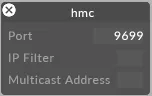
このドライバーはデフォルトで UDP ポート 9699 をリッスンします。
Port(ポート)
ドライバーがデータを受信する UDP ポートです。送信側のデバイスまたはコントローラーで設定されているポートに一致するように設定します。
IP filter(IP フィルター・任意)
受信データを特定の送信元 IP アドレスに制限します。ネットワーク上に複数の送信元が存在する場合や、単一の送信元を分離したい場合に便利です。空欄のままにすると、任意の IP からのデータを受け入れます。
Multicast address(マルチキャストアドレス・任意)
システムが使用するマルチキャストグループアドレスです。送信側がマルチキャスト用に設定されている場合にのみ必要で、送信元が使用する正確なマルチキャストアドレスを入力します。ユニキャストまたはブロードキャスト構成の場合は空欄のままにします。
開発者ドキュメント