

Kinesys ドライバー
Kinesys は、6 自由度の軸(X、Y、Z の並進と X、Y、Z の回転)を提供するモーションコントロールシステムです。UDP プロトコルを使用して、位置・回転データをネットワーク経由で Disguise に送信します。
Designer は Vector と K2 の両製品に対応しています。
Kinesys Driver は、Kinesys のモーターやコントローラーからリアルタイムのモーションデータを受信し、物理的な動きで Disguise 内の自動化や仮想オブジェクトを駆動するために使用します。これにより、実世界のリギングシステムと仮想またはメディア駆動の要素との間でシームレスな同期が可能になります。
このドライバーは、特に次のような場合に役立ちます。
- Kinesys モーションシステムをバーチャルプロダクションや舞台自動化と統合する場合。
- 物理的な動き(ホイスト、トラス、スクリーン)をメディア再生と同期する場合。
- 実世界の Kinesys モーションを Designer 内でリアルタイムに可視化する場合。
- ライブのモーター位置に依存するインタラクティブまたはリアクティブな環境を作成する場合。
- 本番のショープログラミングに移行する前に軸の動作をテスト・検証する場合。
- インストール、リハーサル、運用中に Kinesys データストリームを監視する場合。
エンジンとパラメーターのデータを K2 または Vector から直接受信することで、このドライバーは Kinesys システムの各軸を Disguise 内の対応するスクリーンまたはオブジェクトの動きにマッピングできます。
ドライバープロパティ
Section titled “ドライバープロパティ”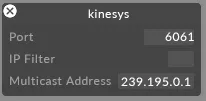
このドライバーはデフォルトで UDP ポート 6061 をリッスンします。
Port(ポート)
ドライバーがデータを受信する UDP ポートです。送信側のデバイスまたはコントローラーで設定されているポートに一致するように設定します。
IP filter(IP フィルター・任意)
受信データを特定の送信元 IP アドレスに制限します。ネットワーク上に複数の送信元が存在する場合や、単一の送信元を分離したい場合に便利です。空欄のままにすると、任意の IP からのデータを受け入れます。
Multicast address(マルチキャストアドレス・任意)
システムが使用するマルチキャストグループアドレスです。送信側がマルチキャスト用に設定されている場合にのみ必要で、送信元が使用する正確なマルチキャストアドレスを入力します。ユニキャストまたはブロードキャスト構成の場合は空欄のままにします。
Kinesys K2 でのマルチキャストアドレスとパラメーターアドレスの確認
Section titled “Kinesys K2 でのマルチキャストアドレスとパラメーターアドレスの確認”Disguise の外部で、K2 ソフトウェアを使用してエンジンのマルチキャストアドレスとパラメーターアドレスを見つけます。K2 インターフェースに不慣れな場合は、Kinesys の担当者またはオペレーターに相談してください。
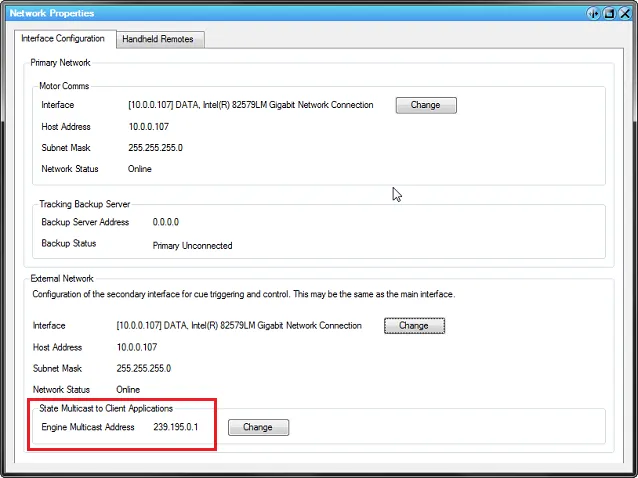
Engine Multicast Address(エンジンマルチキャストアドレス)
Section titled “Engine Multicast Address(エンジンマルチキャストアドレス)”これは、K2 が位置データをブロードキャストするために使用するアドレスです。
K2 インターフェースには以下のように表示されます。
Parameter Address(パラメーターアドレス)
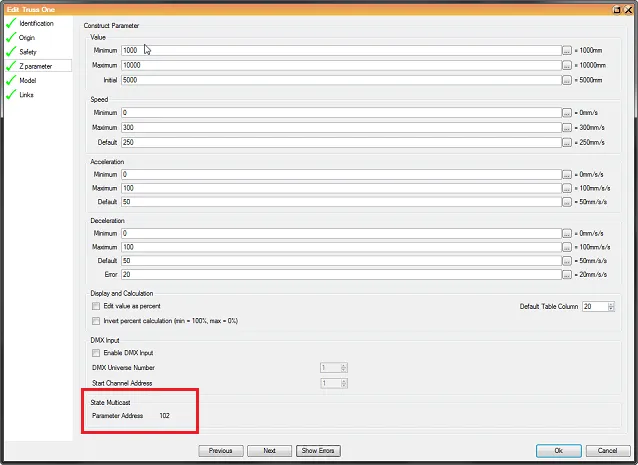
Section titled “Parameter Address(パラメーターアドレス)”各モーションパラメーター(X、Y、Z、回転軸など)には、個別の パラメーターアドレス があります。
これは各軸のデータ識別子として機能します。
Disguise での Kinesys Driver の設定
Section titled “Disguise での Kinesys Driver の設定”- Engine Multicast Address を Kinesys Driver の Multicast address フィールドに入力します。
- 制御したい軸ごとに ScreenPositionAxis オブジェクトを作成します(たとえば Position X、Rotation Z)。詳しくは PositionAxis オブジェクトの作成を参照してください。
- 各パラメーターの K2 Parameter Address をコピーし、対応する ScreenPositionAxis の id フィールドに貼り付けます。
開発者ドキュメント