

STS ドライバー
STS Driver を使うと、Disguise は STS 自動化プロトコルを使用するシステムから位置またはステータス情報を受信できます。STS は、特定の舞台制御環境で、動く舞台要素向けの軽量な自動化データを送信するために使用され、Disguise 内でコンテンツのアライメントを駆動するために使用できるリアルタイムの位置更新を提供します。
インストールが特定のネットワーク構成の変更を必要としない限り、デフォルトのドライバー設定の使用を推奨します。
STS Driver は、プロダクションに次のものが含まれる場合に使用します。
- STS 位置データを出力する基本的な舞台自動化システム。
- リフト、トロリー、シンプルな電動オブジェクトなどの動く舞台要素。
- 機械要素の既知の位置とコンテンツを同期する場合。
- 自動化の動きに基づいてコンテンツの変化をトリガーする場合。
- より複雑なプロトコルではなく STS を出力する、軽量またはレガシーの自動化ハードウェア。
STS は、モーションデータが比較的シンプルで、Disguise が高度な多軸自動化情報ではなく位置または移動ステータスのみを必要とするプロダクションに適しています。
ドライバープロパティ
Section titled “ドライバープロパティ”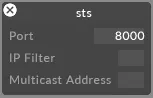
このドライバーはデフォルトで UDP ポート 8000 をリッスンします。
Port(ポート)
ドライバーがデータを受信する UDP ポートです。送信側のデバイスまたはコントローラーで設定されているポートに一致するように設定します。
IP filter(IP フィルター・任意)
受信データを特定の送信元 IP アドレスに制限します。ネットワーク上に複数の送信元が存在する場合や、単一の送信元を分離したい場合に便利です。空欄のままにすると、任意の IP からのデータを受け入れます。
Multicast address(マルチキャストアドレス・任意)
システムが使用するマルチキャストグループアドレスです。送信側がマルチキャスト用に設定されている場合にのみ必要で、送信元が使用する正確なマルチキャストアドレスを入力します。ユニキャストまたはブロードキャスト構成の場合は空欄のままにします。
開発者ドキュメント