

NatNet ドライバー
NatNet Driver は、NatNet プロトコルを使用して OptiTrack システムからリアルタイムのトラッキングデータを受信します。NatNet は、リジッドボディの位置、マーカー、スケルトン、メタデータをネットワーク経由で送信する、広く使用されているモーションキャプチャストリーミング API で、バーチャルプロダクション、xR、リアルタイム環境で使用されます。
このドライバーにより、Disguise は OptiTrack サーバーをサブスクライブし、受信トラッキングデータをプロジェクトに直接ストリーミングできます。ほとんどのセットアップでは、正しいマルチキャストアドレスとデータポートのみが必要で、追加の接続情報は通信とサーバーステータスの確認に役立ちます。
NatNet Driver は、バーチャルプロダクション、xR ワークフロー、またはリアルタイム自動化向けに OptiTrack モーションキャプチャデータを Disguise に統合するときに使用します。このドライバーは Motive からリジッドボディのトラッキングデータを直接ストリーミングし、仮想オブジェクト、カメラ、キャラクター、環境が実世界の動きを高精度で追従できるようにします。
このドライバーは、特に次のような場合に役立ちます。
- OptiTrack のリジッドボディトラッキングをバーチャルプロダクションや xR シーンに取り込む場合。
- モーションキャプチャのカメラリグを使用して仮想カメラを駆動する場合。
- リアルタイムのインタラクションのために、パフォーマー、プロップ、手持ちオブジェクトをトラッキングする場合。
- 物理的なモーションを 3D 環境やメディア再生と同期する場合。
- Motive のライブモーションキャプチャデータを使用して NatNet ストリーミングをテストまたは検証する場合。
- 安定したネットワーク通信を確保するために、サーバー接続の詳細(バージョン、ポート、検出ステータス)を監視する場合。
NatNet は高頻度・低レイテンシーのデータストリーミングに対応しているため、このドライバーは、実世界の動きを仮想コンテンツに正確に一致させる必要がある高速で精密なトラッキングに適しています。
ドライバープロパティ
Section titled “ドライバープロパティ”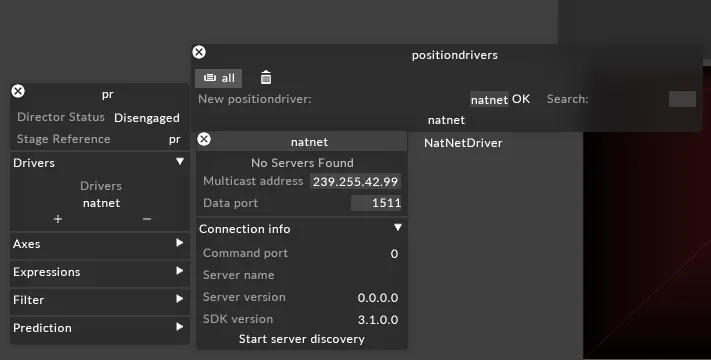
Multicast Address(マルチキャストアドレス)
Section titled “Multicast Address(マルチキャストアドレス)”NatNet トラッキングデータを受信する マルチキャストグループアドレス を指定します。
これは、OptiTrack Motive の構成で設定されたマルチキャストアドレスと一致する必要があります。
Data Port(データポート)
Section titled “Data Port(データポート)”NatNet がモーションデータストリームを送信する UDP ポート です。
これが Motive で構成された「Data Port」と一致していることを確認してください。
Connection Info(接続情報)
Section titled “Connection Info(接続情報)”このセクションは、Disguise と NatNet サーバー間の接続に関する診断情報を表示します。
- Command Port — NatNet サーバーとのコマンド/制御通信に使用されるポートです。
- Server Name — 接続されている Motive/OptiTrack サーバーの名前です。
- Server Version — 現在使用されている NatNet サーバーのバージョンです。
- SDK Version — ドライバーが対応する NatNet SDK のバージョンです。
- Start Server Discovery — ネットワーク上で利用可能な NatNet サーバーを自動検出するスキャンを開始します。
この情報を使用して、Disguise が OptiTrack システムに正しく接続され、互換性のあるバージョンの Motive/NatNet を実行していることを確認してください。
開発者ドキュメント