

Unity でのリモートテキストパラメーター
公開パラメーターのワークフローは、Unity エンジンの Text GameObject を使ってライブテキストパラメーターを公開するためにも使用できます。Remote Parameters ワークフローを使って Designer でテキスト入力フィールドを公開し、テキストをリアルタイムで編集できます。
Text GameObject を作成する
Section titled “Text GameObject を作成する”シーンに Text GameObject を追加すると、RenderStream Layer を使って色、サイズ、テキストなどのテキストプロパティを Disguise から調整できるようになります。Unity プロジェクトに RenderStream プラグインが追加され、有効になっていることを確認してください。
リモートテキストパラメーターのセットアップ
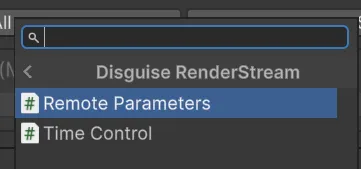
Section titled “リモートテキストパラメーターのセットアップ”- Designer 内から Text GameObject のテキストを制御するには、Text GameObject を選択し、Disguise RenderStream カテゴリの Remote Parameters コンポーネントを追加します。
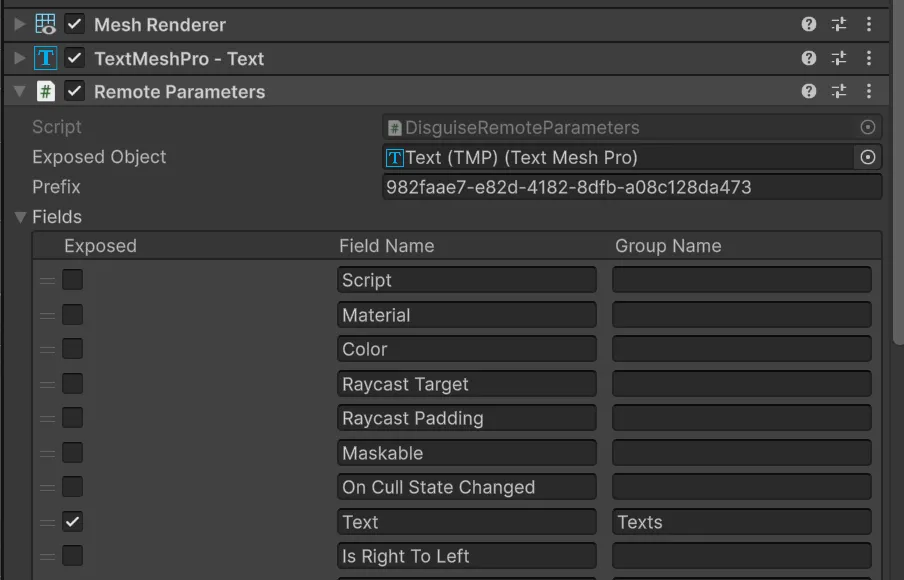
- Text GameObject の Text コンポーネントを、Remote Parameters コンポーネントの Exposed Object 変数にドラッグします。必要なパラメーターを有効または無効にします。
- プロジェクトを保存して ビルドします。
- これで、Designer 内からテキストを制御できます。