

OSC ドライバー
OSC Driver は、外部デバイスやアプリケーションから Open Sound Control(OSC)メッセージを受信し、それを Disguise 内の自動化値に変換します。OSC は柔軟なネットワークベースのプロトコルで、ショー制御、照明、インタラクティブメディア、オーディオシステム、リアルタイムのビジュアル環境で広く使用されています。
このドライバーは 2 つの主要なプロパティを公開します。メッセージを提供する OSC デバイスと、どの OSC メッセージを処理するかを決定するオプションのアドレスフィルターです。
OSC Driver は、リアルタイムの OSC メッセージを Disguise に取り込んで、自動化軸を制御したり、動作をトリガーしたり、インタラクティブな要素を駆動したりする必要があるときに使用します。OSC はクリエイティブ、ライブ、インタラクティブの各業界で使用される柔軟なプロトコルであり、このドライバーは外部システムが数値またはイベントベースのデータを送信するワークフローに最適です。
このドライバーは、特に次のような場合に役立ちます。
- TouchDesigner、Max/MSP、QLab、Unreal、Unity、Ableton、その他の OSC 対応ツールなどのソフトウェアから自動化軸を駆動する場合。
- OSC メッセージを通じてキュー、アニメーション、またはロジックイベントをトリガーする場合。
- センサー、カメラ、またはカスタムスクリプトが OSC を出力するインタラクティブインスタレーションを統合する場合。
- メディアサーバー、照明卓、サウンドシステム、または制御デバイスを Disguise にブリッジする場合。
- 専用ハードウェアなしでリアルタイムデータストリームをプロトタイプ化・テストする場合。
- 複数のデバイスが同じ OSC ネットワークを共有する場合に OSC メッセージをフィルタリング・ルーティングする場合。
OSC は任意のデータ構造とアドレスパスに対応しているため、このドライバーは柔軟な制御が必要なカスタムワークフロー、クリエイティブなプロトタイピング、インタラクティブなデザインに適しています。
ドライバープロパティ
Section titled “ドライバープロパティ”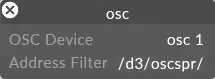
OSC Device(OSC デバイス)
Section titled “OSC Device(OSC デバイス)”Disguise がリッスンすべき OSC デバイス を選択します。
これは次のものを表す場合があります。
- ソフトウェアソース(TouchDesigner、QLab、Max/MSP、Unreal など)。
- OSC メッセージを出力するハードウェアコントローラー。
- 送信元として構成された任意の OSC 対応システム。
Disguise は、アドレスフィルターに従って、選択したデバイスからルーティングされたすべてのメッセージを受信します。
Address Filter(アドレスフィルター)
Section titled “Address Filter(アドレスフィルター)”Disguise が処理すべきメッセージの OSC アドレスパスのプレフィックス を指定できます。
- 軸名を除いた OSC アドレスを入力します。
- このフィールドを 空 のままにすると、すべての OSC メッセージ を受信します。
例:
/d3/oscspr//stage/pos//camera/zoom/
このフィルターは、複数のシステムやスクリプトが同じ OSC ネットワークを共有する場合に、OSC メッセージのサブセットを分離するのに便利です。
開発者ドキュメント