

NG360 ドライバー
NG360 Driver は、NG360 エンコーダーデバイスから自動化データを受信します。 これらのデバイスは通常、Disguise 内の自動化軸を駆動するために使用できる回転または位置のエンコーダー値を提供します。このドライバーは、標準的なネットワーク構成に加えて、エンコーダーを識別し、シリアル通信ポートを定義し、軸の分配を管理するために使用される NG360 固有のプロパティに対応しています。
ほとんどのインストールはデフォルト構成で正しく動作します。NG360 デバイスがカスタムアドレッシングを使用している場合や、特定の COM ポート経由で接続されている場合にのみ、設定を更新してください。
NG360 Driver は、Disguise 内の自動化ワークフロー向けに精密な回転または位置データを出力する NG360 エンコーダーハードウェアを統合するときに使用します。NG360 デバイスは、機械システム、ロボティクス、モーションリグ、光学エンコーダー、正確なリアルタイムの移動トラッキングを必要とするインスタレーションでよく使用されます。
このドライバーは、特に次のような場合に役立ちます。
- 自動化軸を駆動するための連続的なエンコーダー値を受信する場合。
- 仮想オブジェクトやコンテンツを物理的な回転や動きと同期する場合。
- リハーサル、キャリブレーション、システムテスト中にエンコーダーの動作を監視する場合。
- 一意のエンコーダーアドレスによって複数の NG360 デバイスを区別する場合。
- ネットワークインフラなしで作業する際にシリアル接続の NG360 ユニットを使用する場合。
- エンコーダーの動きがロジックやシーンの動作に影響するフィードバック駆動システムを作成する場合。
- インタラクティブまたはメディア駆動のインスタレーションで機械的な動きを制御または検証する場合。
NG360 デバイスは非常に安定したエンコーダー読み取り値を提供するため、このドライバーは、精密な回転、増分的なモーショントラッキング、または物理ハードウェアと仮想コンテンツの同期を必要とするワークフローに適しています。
ドライバープロパティ
Section titled “ドライバープロパティ”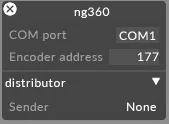
Network Properties(ネットワークプロパティ)
Section titled “Network Properties(ネットワークプロパティ)”Port(ポート)
Section titled “Port(ポート)”NG360 データを受信する UDP ポート です。
エンコーダーシステムが標準外のポートでブロードキャストする場合は、これを変更します。
IP Filter(IP フィルター・任意)
Section titled “IP Filter(IP フィルター・任意)”受信データを特定の 送信元 IP アドレス に制限します。
複数のデバイスが同じネットワークでブロードキャストしている場合や、意図したエンコーダーからのみデータを受信するようにする場合に便利です。
Multicast Address(マルチキャストアドレス・任意)
Section titled “Multicast Address(マルチキャストアドレス・任意)”NG360 データが送信される マルチキャストグループ です。
システムがマルチキャストルーティング用に明示的に構成されている場合にのみ設定します。
NG360-Specific Properties(NG360 固有のプロパティ)
Section titled “NG360-Specific Properties(NG360 固有のプロパティ)”Encoder Address(エンコーダーアドレス)
Section titled “Encoder Address(エンコーダーアドレス)”このドライバーインスタンスがリッスンすべきエンコーダーアドレスを識別します。
複数のエンコーダーがアクティブな場合や、ネットワーク上のユニットを区別するためにアドレッシングが必要な場合に使用します。
COM Port(COM ポート)
Section titled “COM Port(COM ポート)”NG360 デバイスがローカルに接続されている場合に使用する シリアル COM ポート を指定します。
NG360 エンコーダーがネットワークではなく USB/シリアル経由で通信する場合に必要です。
Distributor(ディストリビューター)
Section titled “Distributor(ディストリビューター)”受信した NG360 エンコーダーデータが Disguise 内の自動化軸にどのようにルーティングされるかを制御します。
ほとんどの場合、デフォルトオプション(None)で十分で、値を構成された軸に直接渡します。
一部のバージョンのインターフェースでは、ディストリビューターが使用する内部ルーティング方式を表す Sender フィールドが表示される場合があります。
None が唯一の利用可能なオプションである場合、このドライバーでは代替のルーティングモードはサポートされていません。
カスタムルーティングや値の分配を必要とする高度なセットアップで作業する場合にのみ、この設定を使用してください。
開発者ドキュメント