

Navigator ドライバー
Navigator Driver は、FTSI Navigator モーションコントロールシステムから軸データを受信します。
Navigator はリアルタイムの位置・速度情報を UDP 経由で送信し、Disguise はそれを自動化軸に変換します。このドライバーは、正しい解析と軸の更新を保証するため、受信データが特定のパケット構造に従っていることを必要とします。
Navigator Driver は、FTSI Navigator モーションコントロールシステムを Disguise と統合するときに使用します。 このドライバーは、リアルタイムの位置・速度データを自動化軸に変換し、物理的な動きで仮想オブジェクト、舞台要素、または同期されたメディア再生を駆動できるようにします。
このドライバーは、特に次のような場合に役立ちます。
- FTSI Navigator 制御のウインチ、ホイスト、トラッキングシステムからライブの軸データを受信する場合。
- 仮想オブジェクトやコンテンツを物理的な舞台機構と同期する場合。
- リハーサルやアライメントのために Navigator のモーションデータを Designer 内で可視化する場合。
- 連続的なモーター位置と速度に基づいて複雑な自動化動作を駆動する場合。
- セットアップまたはトラブルシューティング中に Navigator の出力フォーマットをテストまたは検証する場合。
- 複数のモーションチャンネルが 1 つのパケットでストリーミングされる多軸システムを扱う場合。
Navigator は高頻度の更新に対応しているため、このドライバーはメディア駆動型またはインタラクティブな制作環境での正確なリアルタイムモーショントラッキングに適しています。
ドライバープロパティ
Section titled “ドライバープロパティ”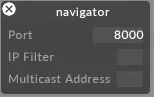
このドライバーはデフォルトで UDP ポート 8000 をリッスンします。
Port(ポート)
ドライバーがデータを受信する UDP ポートです。送信側のデバイスまたはコントローラーで設定されているポートに一致するように設定します。
IP filter(IP フィルター・任意)
受信データを特定の送信元 IP アドレスに制限します。ネットワーク上に複数の送信元が存在する場合や、単一の送信元を分離したい場合に便利です。空欄のままにすると、任意の IP からのデータを受け入れます。
Multicast address(マルチキャストアドレス・任意)
システムが使用するマルチキャストグループアドレスです。送信側がマルチキャスト用に設定されている場合にのみ必要で、送信元が使用する正確なマルチキャストアドレスを入力します。ユニキャストまたはブロードキャスト構成の場合は空欄のままにします。
FTSI Navigator UDP Packet Format(FTSI Navigator UDP パケット形式)
Section titled “FTSI Navigator UDP Packet Format(FTSI Navigator UDP パケット形式)”Designer は、Navigator システムが特定の形式でデータを送信することを必要とします。各軸は次の形式でデータを送信する必要があります。
ID:POS,VELOCITY;
ID = 軸 ID
POS = 浮動小数点数としての軸位置
VELOCITY = 浮動小数点数としての軸速度
例(単一軸)
Section titled “例(単一軸)”1:-24.034,1.323;
例(1 つのメッセージ内の複数軸)
Section titled “例(1 つのメッセージ内の複数軸)”Navigator メッセージには、複数の軸エントリが連続して含まれる場合があります。
ID:POS,VELOCITY;ID:POS,VELOCITY;ID:POS,VELOCITY;.....
1:-24.034,1.323;2:5.346,12.098;3:9.064,2.511;
開発者ドキュメント