

LCPUSB ドライバー
LCPUSBDriver は、USB 経由でマシンに直接接続された LCPUSB 対応ハードウェアから自動化データを受信するために使用します。このドライバーはデバイスから送信されるデータをリッスンし、Disguise 内で使用できる自動化値に変換します。ドライバーは USB 通信を直接処理するため、ポート、IP フィルター、マルチキャスト設定などのネットワーク構成を 必要としません。
ほとんどの場合、デフォルト設定で安定した動作が得られます。調整は、カスタムのハードウェア動作やフィルタリング要件で作業する場合にのみ行ってください。
LCPUSBDriver は、ネットワーク接続ではなく USB 経由で直接通信する自動化デバイスを扱うときに使用します。このドライバーは LCPUSB 対応ハードウェアから位置、センサー、または制御データを読み取り、それらの値を Disguise 内で自動化、ロジック、またはインタラクティブな動作に使用できるようにします。
このドライバーは、特に次のような場合に役立ちます。
- USB ベースのモーションコントローラー、センサー、またはカスタムハードウェアインターフェースを接続する場合。
- ネットワークプロトコルに対応していないデバイスから低レイテンシーのデータを受信する場合。
- 制御された環境でカスタム自動化ハードウェアをプロトタイプ化またはテストする場合。
- コンパクトまたは組み込みのマイクロコントローラーデバイスを自動化ワークフローに統合する場合。
- 組み込みのローパスフィルターを使用してノイズの多い信号に平滑化を適用する場合。
- ネットワークインフラなしで作業する際に安定した通信を確保する場合。
LCPUSB は USB 経由で直接通信するため、信頼性、シンプルさ、または可搬性が求められるセットアップ(実験室環境、小規模インストール、迅速なプロトタイピングのワークフローなど)に最適です。
ドライバープロパティ
Section titled “ドライバープロパティ”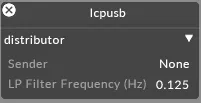
Sender(センダー)
Section titled “Sender(センダー)”データソースとして機能している アクティブな USB デバイス を表示します。
対応する LCPUSB デバイスが接続されていない場合、このフィールドには None が表示されます。
対応デバイスが複数利用可能な場合は、ドロップダウンから適切なデバイスを選択します。
LP Filter Frequency (Hz)(LP フィルター周波数(Hz))
Section titled “LP Filter Frequency (Hz)(LP フィルター周波数(Hz))”受信する自動化データに ローパスフィルター を適用します。
ハードウェアデバイスからのノイズの多い値や急激に変動する値を平滑化するために使用します。
- 値が大きいほど → 平滑化が少なく、応答が速い
デフォルト値はほとんどのワークフローに適していますが、接続されたハードウェアの動作に応じて調整できます。
開発者ドキュメント