

Siemens SIMOTION ドライバー
Siemens SIMOTION Driver を使うと、Disguise は Siemens SIMOTION モーションコントローラーから位置データを受信できます。Siemens SIMOTION システムは、産業用自動化、ロボティクス、精密モーションコントロールのアプリケーションでよく使用されます。
Disguise に接続すると、コンテンツのアライメントや位置オフセットを駆動する軸位置情報を供給できます。
システムが特定のネットワーク構成を必要としない限り、デフォルトのドライバー設定の使用を推奨します。
Siemens SIMOTION Driver は、ワークフローに次のものが含まれる場合に使用します。
- Siemens SIMOTION ハードウェアで駆動されるモーション制御の舞台要素。
- 実世界の動きが Disguise 内のコンテンツの動きに反映される必要がある、直線軸または回転軸。
- ライブ環境に統合された産業用またはエンジニアリンググレードの自動化システム。
- リフト、トラック、アーム、精密駆動コンポーネントなどの機械とコンテンツを同期する場合。
Siemens SIMOTION は通常、高い位置精度と決定論的なモーションが必要な環境で使用されます。このドライバーにより、これらの軸を Disguise 内で自動化ソースとして表現できます。
ドライバープロパティ
Section titled “ドライバープロパティ”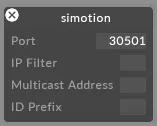
ID prefix(ID プレフィックス)
Section titled “ID prefix(ID プレフィックス)”設定すると、この文字列が各受信軸 ID の先頭に追加されます。
これは、命名規則が必要な場合や、軸識別子を区別する必要がある複数の SIMOTION ソースを扱う場合に便利です。
Port(ポート)
ドライバーがデータを受信する UDP ポートです。送信側のデバイスまたはコントローラーで設定されているポートに一致するように設定します。
IP filter(IP フィルター・任意)
受信データを特定の送信元 IP アドレスに制限します。ネットワーク上に複数の送信元が存在する場合や、単一の送信元を分離したい場合に便利です。空欄のままにすると、任意の IP からのデータを受け入れます。
Multicast address(マルチキャストアドレス・任意)
システムが使用するマルチキャストグループアドレスです。送信側がマルチキャスト用に設定されている場合にのみ必要で、送信元が使用する正確なマルチキャストアドレスを入力します。ユニキャストまたはブロードキャスト構成の場合は空欄のままにします。
開発者ドキュメント