

Screen Position Axis Expressions
Screen Axis Expressions を使うと、ScreenPositionAxis オブジェクトから出力される値に算術演算を行い、定義したスクリーンのプロパティに送信できます。
エクスプレッションの作成
Section titled “エクスプレッションの作成”エクスプレッションを作成するには、PositionReceiver エディターの Expressions セクション内の + ボタンを選択し、新しいオブジェクトの名前をテキストフィールドに入力して Enter を押します。
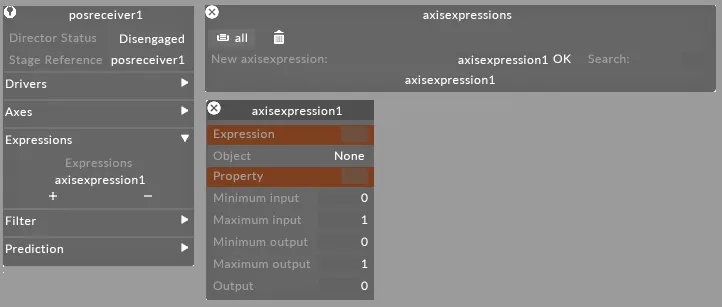
エクスプレッションのプロパティ
Section titled “エクスプレッションのプロパティ”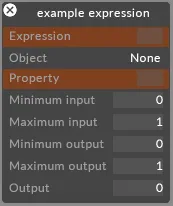
Expression エディターは、ScreenPositionAxis オブジェクトから出力される値に算術演算を行い、定義したスクリーンのプロパティに送信するために使用します。
Expression(エクスプレッション)
Section titled “Expression(エクスプレッション)”定義された軸に対して実行される算術式です。ScreenPositionAxis オブジェクトは名前で定義されます。例:
(ledscreenx*ledscreeny)/2
ここで ledscreenx と ledscreeny は ScreenPositionAxis オブジェクトです。
Screen(スクリーン)
Section titled “Screen(スクリーン)”移動・回転させたいスクリーンです。軸ではなくエクスプレッションの出力を使用したい場合は、オブジェクトの property フィールドを空欄のままにしてください。
Min input(最小入力)
Section titled “Min input(最小入力)”ScreenPositionAxis オブジェクトから受信する最小入力値です。
Max input(最大入力)
Section titled “Max input(最大入力)”ScreenPositionAxis オブジェクトから受信する最大入力値です。
Min output(最小出力)
Section titled “Min output(最小出力)”定義したプロパティの最小出力値です。
Max output(最大出力)
Section titled “Max output(最大出力)”定義したプロパティの最大出力値です。
Output(出力)
Section titled “Output(出力)”現在の出力値です。