

Audio Reactivity
このコンテンツはまだ日本語訳がありません。
Audio reactivity refers to visual elements reacting to a live audio signal in real time.
Designer supports this workflow with the FloatArray object. This object contains a list of numbers, which represents an audio frequency spectrum that can be passed into a render engine:
- Notch: a Notch layer receives the array in an exposed array parameter, such as Exposable Array. Requires Designer r33.2 or later.
- Unreal Engine: a RenderStream workload receives the array as a float array parameter. Requires the RenderStream 3.0 plugin for Unreal Engine and Designer r34.0.2 or later.
There are two types of FloatArray objects that are driven from different sources.
FloatArrayAudioLine
Section titled “FloatArrayAudioLine”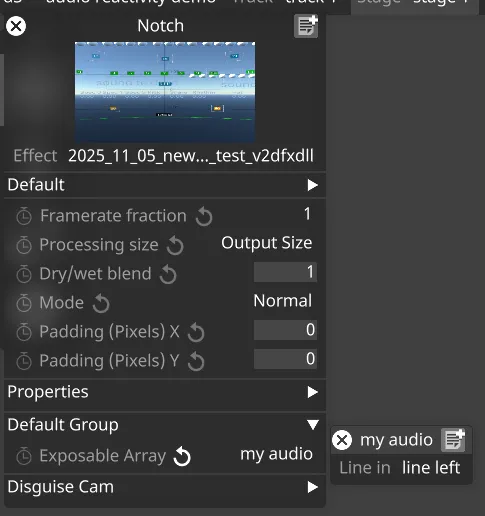
Driven by a local AudioLine, selected in the Line in field, and uses Designer’s internal frequency decomposition algorithm. Note that this decomposition is limited to 128 frequency bands.
FloatArrayOsc
Section titled “FloatArrayOsc”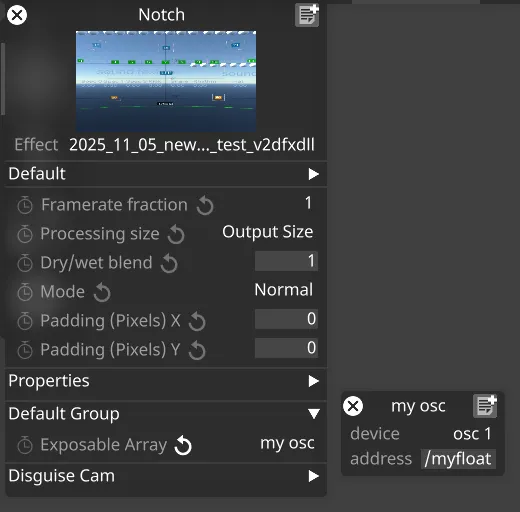
Driven by incoming OSC messages. Designer reads the float arguments in each message and ignores any others. Designer distributes and synchronises them across the session, which works well for multi-machine setups.
The render engine requests the size of the array it needs. If the array object is larger than the requested size, array elements beyond size will be trimmed off. If the array object is smaller than the requested size, the array will be zero-padded.
To use live audio levels and frequency content in expressions instead, see Audio Analyser. For an overview of audio in Designer, see Audio Overview.
© 2026 Disguise